



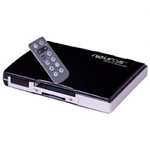
Neuros MPEG4 Recorder does what it promises to do well, but there's room for improvement
 Monday, July 03, 2006 Monday, July 03, 2006by Mike Adams, the Health Ranger Editor of NaturalNews.com (See all articles...) Tags: media recorder, user interface, open-source |
- 'Rollie pollies' remove heavy metals from soil, stabilizing growing conditions, protecting groundwater
- Fluoridation is the Ultimate Deception (Opinion)
- The MMR vaccine, autism connection
- Children's Fitness Levels Continue to Decline; Today's Kids are Weak and Unfit
- Detox with diatomaceous earth to remove allergies, mercury, chemicals, GMOs, parasites
- Is synthetic folic acid toxic to your body? Research suggests 'yes'
- Chinese herbs kill cancer cells: study
- Prevent arthritis and cancer with broccoli: Research proven
- The powerful health benefits of curcumin
- Harvard research links fluoridated water to ADHD, mental disorders
- How to heal cavities naturally
- Extreme breastfeeding? Woman saves Rottweiler pup by breastfeeding it alongside her own infant
- Vaccine fraud exposed: Measles and mumps making a huge comeback because vaccines are designed to fail, say Merck virologists
- Curing Lyme disease - Causes and solutions
- Article updated with new message from the Health Ranger
- Bosnia war survivor warns of things to come in collapse of America
- Doctors billing Medicare for patients' unneeded, expensive tests
- Six things happy couples do differently than the rest
- The best and worst forms of magnesium to take as a supplement
- The MMR vaccine, autism connection
- The United Nations 2030 Agenda decoded: It's a blueprint for the global enslavement of humanity under the boot of corporate masters
- 'Rollie pollies' remove heavy metals from soil, stabilizing growing conditions, protecting groundwater
- How to heal a cavity naturally and nutritionally without the need for 'drilling and filling'
- Cannabis kicks Lyme disease to the curb
- Vaccine fraud exposed: Measles and mumps making a huge comeback because vaccines are designed to fail, say Merck virologists
- How to heal cavities naturally
- Ten ways to use colloidal silver's amazing healing abilities
- Boost Low White Blood Cell Count and Immune Function Naturally
- Six natural remedies for acid reflux
- Is synthetic folic acid toxic to your body? Research suggests 'yes'
- Article updated with new message from the Health Ranger
- Harvard research links fluoridated water to ADHD, mental disorders
- Fluoridation is the Ultimate Deception (Opinion)
- Olive oil antioxidant naturally kills all cancer cells tested within an hour
- Man heals stage 3 prostate and colon cancers with raw food diet
- Every neighborhood in America mapped to show risk levels of lead contamination in the water supply
- The MMR vaccine, autism connection
- The best and worst forms of magnesium to take as a supplement
- The REAL FAKE NEWS exposed: '97% of scientists agree on climate change' is an engineered hoax... here's what the media never told you
- The United Nations 2030 Agenda decoded: It's a blueprint for the global enslavement of humanity under the boot of corporate masters
- Apricot Seeds Kill Cancer Cells without Side Effects
- Water filters tested for heavy metals removal: Zero Water, Pur, Brita, Mavea, Culligan, Seychelle and Waterman
- Peanut oil in vaccines behind widespread peanut allergy epidemic
- Indian black salve: The magical cancer cure
- Forget Filling Cavities: Regrow Your Teeth Instead
- Bill Gates says vaccines can help reduce world population
- NASA admits to spraying Americans with poisonous chemtrails
- The remarkable health benefits of Epsom salt baths
- Sugar takes on high fructose corn syrup in high stakes legal battle to see which is most unhealthy
- Ten ways to use colloidal silver's amazing healing abilities
- Baking soda, cancer and fungus
- Kale is great for your sex life
- Eighteen Overlooked Symptoms of Adrenal Fatigue
- INVESTIGATION: Three days before Dr. Bradstreet was found dead in a river, U.S. govt. agents raided his research facility to seize a breakthrough cancer treatment called GcMAF
- Eleven days before Iran bombed Tel Aviv, my microscope revealed haunting images of EXACTLY what would happen
- Morphic resonance “remote viewing” reveals iconic Middle East images of stealth bombers, a falcon and a one-horned ram
- DECENTRALIZED SPIRITUALITY and the true teachings of Christ: Overcoming the censorship, threats and lies of organized religion to truly know God and the Universal Christ
- HEALTH SECRETS: How to Instantly Block MSG Toxicity Using Natural Substances (and the secret of Methylene Blue)
- The Coming Gold Revaluation: Strategic Financial Realignment in an Era of Dollar Collapse
- The AI Data Center Wars Have Begun… Farms, Water and Electricity is Stripped from Humans to Power the Machines
- Urgent Wake-Up Call: The Coming AI Robot Wars and the Great Human Unity
- The War on Light: How Governments and Big Pharma Keep You Sick By Blocking Healing Photons
- Amazing microscopy photos reveal how freezing crystals attempt to mimic electronic structures they are touching
- THE AI RACE IS ALREADY WON: How China’s power dominance (and America’s climate lunacy surrender) secured its victory in the race to AI superintelligence
- Why the U.S. Government May be Seeking to Slaughter 200 Million Americans to Free Up Excess Power for AI Data Centers and the Race to Superintelligence
- Trump's Trojan Horse: How Stablecoins Are Secretly Paving the Way for a CBDC Control Grid – an Interview with Catherine Austin Fitts
- EXCLUSIVE REPORT: The Trump-Putin Meeting in Alaska - A Historic Pivot that Redefined Global Power
- Shingles surge sparks new focus on holistic care: Tackling pain, immunity and risks
- BOMBSHELL: Internal Pfizer documents exposed and reveal at least 16 PERCENT of their mRNA vaccine "adverse events" are REPRODUCTIVE DISORDERS
- Injecting chemicals is MORE DANGEROUS than eating them, so why is polysorbate 80 banned in ICE CREAM but allowed in VACCINES?
- Exploring the depths of alternative medicine: A comprehensive review of “The Gale Encyclopedia of Alternative Medicine”
- 18 MILLION COVID-JABBED Japanese folks shown to have SIGNIFICANTLY HIGHER DEATH RATES during first year after injection with mRNA clot shots





The PSP is a really capable portable movie player. It's not just a gaming machine -- although it's very good for games -- it's also a great way to watch videos when you are away from your home entertainment system. You can take a couple of movies anywhere in your carry-on luggage or your briefcase, without dragging along a large device like a laptop.
One of the solutions for getting video onto a PSP or other portable video player is a device called the Neuros MPEG4 Recorder. The Neuros Recorder is a standalone recording device. It's only slightly larger than a deck of cards, and it rips incoming video to flash memory such as CompactFlash cards or Memory Stick Pro duo cards. There's no PC required, no USB connection and no software to install. You simply plug the video and audio into this Neuros device, hit play and start recording.
I've tested the unit extensively. It has some strong points and some weak points. On the strong side, the unit does what it promises to do. It rips video to Memory Stick Pro cards or CompactFlash cards using a highly compressed MPEG 4 video format and the simple protocol-encoding layer. The videos play very well on the PSP if you copy them to the right folder with the right name on the Memory Stick. The audio volume may seem a little low from time to time, but if you use headphones, it usually takes care of that problem. So the unit works, and it does fulfill its promises.
Limitations of the Neuros
What's lacking from the unit ultimately prevents me from giving it a five-star rating. First of all, the unit has its own user interface which is quite clunky. It's a bit difficult to navigate at first and it's not at all visually appealing. In order to see the interface, you need to direct the output of this device to a video monitor.The remote control that comes with it also works, but I'm not sure how long the buttons will last. I didn't have any problems with my remote, but the buttons didn't have a quality feel. It felt more like pressing membranes on a microwave keypad rather than clicking buttons on a typical remote control, so I think the remote could be improved quite a bit.
One of the things I really like about Neuros is that it comes from a group of developers with an open-source philosophy. There is an entire developer community building up around this device, and the source code is available and always being improved. So this is the opposite of the Sony BMG people, who believe that nothing should be shared and everything should be proprietary. The fact that Neuros is an open-source community product makes it far more interesting.
One of the features sorely missing from this product is a customizable time limit on the recording. There is a feature where you can limit your recording to one hour, two hours, or three hours, but those are the only choices. What if you have a movie that is 97 minutes? I don't want to have to sit there viewing it for 97 minutes so that I can hit stop. Unfortunately, that's what you have to do right now, because the unit does not allow you to set the recording time to stop automatically at a specific number of minutes.
Video artifacts
Another problem I've noticed with the unit is that the video encoding is less than perfect when an object is panning cross the screen. It tends to jerk its way across the screen in little hopscotch leaps rather than panning smoothly as in the original video source. Now, this may be an artifact of the MPEG-4 encoding algorithm. It may not be the fault of the Neuros hardware; it could be something that's part of the encoding chip. However, it is still present and still very annoying. That's one of the main reasons I ultimately returned the unit, because I couldn't stand to watch videos with those visual artifacts.A much smoother recording algorithm I have found is the DivX algorithm, used by the Plextor hardware encoder, which does a much better job but, of course, takes up a whole lot more disk space. So, the Neuros device is really good at making surprisingly small files for decent quality video, but it's not perfect. If you have an eye for detail, you'll notice that there is something wrong.
So, the bottom line is that the Neuros recorder does what it is advertises, but it lacks some features that I think would be important in the future version of the product. The company that brings it to you has a good open-source philosophy and a commitment to improving the product.
The hardware itself is fine. The interface is clunky and the remote needs some improvements, but overall, if you're just looking to rip some movies to your PlayStation portable, this is a solid product. It does what it promises to do and it doesn't even require a PC. Just don't expect it to go beyond ripping videos for portable video devices. I give this device three stars, and I hope to be able to give it more stars in the future as the product continues to improve.


Media recorder at FETCH.news
Get independent news alerts on natural cures, food lab tests, cannabis medicine, science, robotics, drones, privacy and more.
 About the author:Mike Adams (aka the "Health Ranger") is a best selling author (#1 best selling science book on Amazon.com) and a globally recognized scientific researcher in clean foods. He serves as the founding editor of NaturalNews.com and the lab science director of an internationally accredited (ISO 17025) analytical laboratory known as CWC Labs. There, he was awarded a Certificate of Excellence for achieving extremely high accuracy in the analysis of toxic elements in unknown water samples using ICP-MS instrumentation. Adams is also highly proficient in running liquid chromatography, ion chromatography and mass spectrometry time-of-flight analytical instrumentation.
Adams is a person of color whose ancestors include Africans and Native American Indians. He's also of Native American heritage, which he credits as inspiring his "Health Ranger" passion for protecting life and nature against the destruction caused by chemicals, heavy metals and other forms of pollution.
Adams is the founder and publisher of the open source science journal Natural Science Journal, the author of numerous peer-reviewed science papers published by the journal, and the author of the world's first book that published ICP-MS heavy metals analysis results for foods, dietary supplements, pet food, spices and fast food. The book is entitled Food Forensics and is published by BenBella Books.
In his laboratory research, Adams has made numerous food safety breakthroughs such as revealing rice protein products imported from Asia to be contaminated with toxic heavy metals like lead, cadmium and tungsten. Adams was the first food science researcher to document high levels of tungsten in superfoods. He also discovered over 11 ppm lead in imported mangosteen powder, and led an industry-wide voluntary agreement to limit heavy metals in rice protein products.
In addition to his lab work, Adams is also the (non-paid) executive director of the non-profit Consumer Wellness Center (CWC), an organization that redirects 100% of its donations receipts to grant programs that teach children and women how to grow their own food or vastly improve their nutrition. Through the non-profit CWC, Adams also launched Nutrition Rescue, a program that donates essential vitamins to people in need. Click here to see some of the CWC success stories.
With a background in science and software technology, Adams is the original founder of the email newsletter technology company known as Arial Software. Using his technical experience combined with his love for natural health, Adams developed and deployed the content management system currently driving NaturalNews.com. He also engineered the high-level statistical algorithms that power SCIENCE.naturalnews.com, a massive research resource featuring over 10 million scientific studies.
Adams is well known for his incredibly popular consumer activism video blowing the lid on fake blueberries used throughout the food supply. He has also exposed "strange fibers" found in Chicken McNuggets, fake academic credentials of so-called health "gurus," dangerous "detox" products imported as battery acid and sold for oral consumption, fake acai berry scams, the California raw milk raids, the vaccine research fraud revealed by industry whistleblowers and many other topics.
Adams has also helped defend the rights of home gardeners and protect the medical freedom rights of parents. Adams is widely recognized to have made a remarkable global impact on issues like GMOs, vaccines, nutrition therapies, human consciousness.
In addition to his activism, Adams is an accomplished musician who has released over a dozen popular songs covering a variety of activism topics.
Click here to read a more detailed bio on Mike Adams, the Health Ranger, at HealthRanger.com.

Take Action: Support Natural News by linking to this article from your website
Permalink to this article:
Embed article link: (copy HTML code below):
Reprinting this article:
Non-commercial use OK, cite NaturalNews.com with clickable link.
Follow Natural News on Facebook, Twitter, Google Plus, and Pinterest

Science News & Studies

Medicine News and Information

Food News & Studies

Health News & Studies

Herbs News & Information

Pollution News & Studies

Cancer News & Studies

Climate News & Studies

Survival News & Information

Gear News & Information

News covering technology, stocks, hackers, and more





"Big Tech and mainstream media are constantly trying to silence the independent voices that dare to bring you the truth about toxic food ingredients, dangerous medications and the failed, fraudulent science of the profit-driven medical establishment.
Email is one of the best ways to make sure you stay informed, without the censorship of the tech giants (Google, Apple, Facebook, Twitter, YouTube, etc.). Stay informed and you'll even likely learn information that may help save your own life."
–The Health Ranger, Mike Adams